Android New Worlds
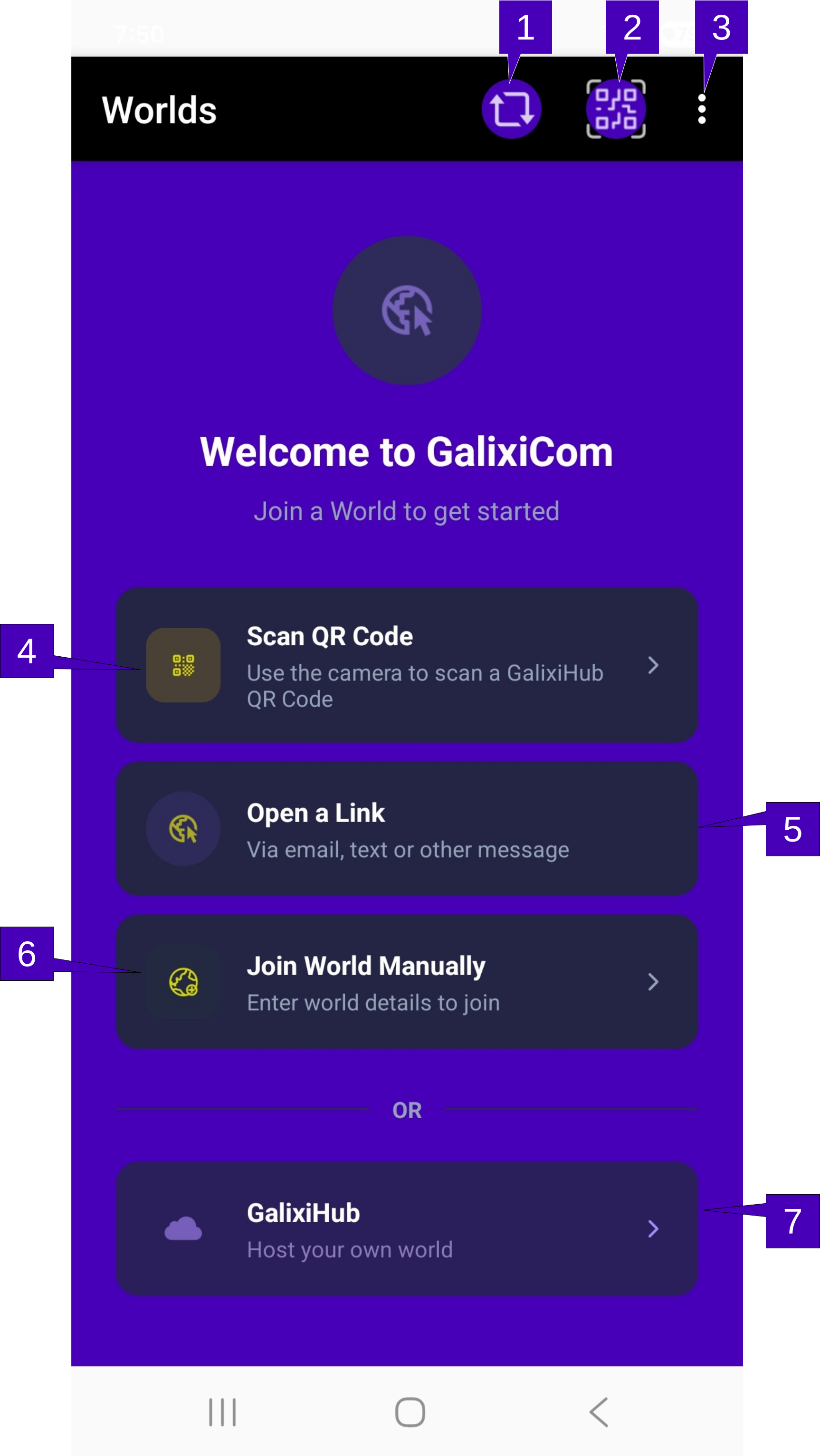
1. Refresh Screen. Tap here to refresh the signal strength and number of members on the world. The Worlds screen statistics are gathered when first shown and not updated automatically. A tap here will re-poll all joined worlds and update the statistics accordingly.
2. Join World. Tap here to pull up the camera to join a world via QR code. Note that only a QR code generated by an instance of GalixiHub will be read here; if a non-GalixiHub generated QR code is scanned, nothing will happen. Once scanned, the world, using the default avatar profile, will be automatically joined. If a code is required to enter the world, the user will be prompted to enter.
3. Menu Overflow. Herein contains the ability to Join World (Manually), Modify Profile, About and Help. Each one of these options is further explained below:
Join World (Manually) allows the user to manually join a world. Joining a world manually will open the Join World screen where the user may enter the device network information of the hosting World.
Modify Profile changes the default avatar settings. Modifying the default avatar settings will NOT change the member avatar settings for current joined worlds. A change here will impact only the next joined world.
Theme which allows the GalixiCom color palate to be adjusted.
About will open the About GalixiCom screen.
Help pulls up this page.
4. Scan QR Code. Performs the same operation as Join World (q.v.) above. With no worlds currently joined, this button is very visible and present as opposed to an icon in the menu.
5. Open a Link. This is strictly an informative frame indicating to the user that they may receive a text or email with a link to join a world. There is no button or other action by tapping here.
6. Join World Manually. A tap here performs the same operation as Join World (Manually) (q.v.) in the menu above. With no worlds currently joined, this button is very visible and present as opposed to a menu selection that a new user would have to search for.
7. GalixiHub. A tap here will open the GalixiHub documentation.. This documents how to setup an instance of GalixiHub on the hardware or platform desired but does not setup a GalixiHub directly. Please refer to the GalixiHub documentation for details on how to setup a world of your own.